I spent an evening fixing a problem that has been open since 2014: ufw does not protect Docker published ports. My firewall said three ports were open. Twelve were, including a control panel that can deploy containers, read every secret, and open a shell.
But that bug is not what this post is about. It is about a decision I made when I put the result on GitHub: there is no executable script in the repository. What it ships is a PROMPT.md. You paste it into your own coding agent, point it at your own server, and let it read what your machine actually looks like before it writes anything.
For this particular class of tool, I think that is the more honest thing to publish. But that claim is worthless on its own — so the first half of this post is the bug, and how I got it wrong twice on my own machine. Without that part, the second half is just a slogan.
The short version
- ufw filters the INPUT chain. Container traffic is routed, so it goes through FORWARD. The two never meet.
ufw deny 8000does nothing to a container — and it will cheerfully tell you the rule was added. - The right place is the
DOCKER-USERchain, the policy must be default-deny, and ports must be matched with--ctorigdstport, never--dport. Get that last part wrong and it fails in a way that looks like it worked. - This tool depends heavily on what your specific machine looks like, so it cannot be a portable script. What I published is the spec that makes an agent build it, not the artifact from my machine.
Part one: ufw said 3 ports, 12 were open
It started as housekeeping. The disk was full, a few containers needed shutting down, and I asked an agent to look over the config while it was in there. Half an hour later I was staring at the terminal realising my Coolify admin panel had been sitting on the public internet for who knows how long.
ufw was active the whole time, reporting that everything was fine.
Your firewall is lying to you
Here is what ufw status said on that machine, with the IP allowlist entries trimmed:
$ ufw status
Status: active

22/tcp    ALLOW   Anywhere
80/tcp    ALLOW   Anywhere
443/tcp   ALLOW   Anywhere
Three ports. Reassuring. Here is what was actually reachable from the internet on the same host:
3000    gogs-app            git server, web UI
6001    coolify-realtime    websocket
6002    coolify-realtime    websocket
8000    coolify             ← admin panel. deploys, secrets, shell
8080    traefik             dashboard
8081    probe-china
8082    telegram-bot
8083    probe-foreign
8089    ipgeo-nginx
10022   gogs-app            git over ssh
Nine extra ports. ufw mentioned none of them. This is not a misconfiguration on my part and it is not a bug in some version — it is what happens by default when Docker and ufw share a host.
Why ufw cannot see containers
ufw is a front end for iptables, and it writes its rules into the INPUT chain. INPUT handles packets whose destination is this host.
Traffic to a container is not destined for the host — it is destined for the container’s private IP. That is routing, and it traverses FORWARD, a chain ufw never touches.
you  ──▶  host process  ──▶  PREROUTING ──▶ INPUT   ──▶  sshd, etc.
                                              ▲
                                              └── ufw is here

you  ──▶  container      ──▶  PREROUTING ──▶ FORWARD ──▶  DOCKER ──▶ container
                                              ▲
                                              └── ufw is NOT here
Worse, Docker does not go through ufw at all. It writes DNAT rules straight into nat/PREROUTING and ACCEPT rules into filter/DOCKER. The moment you run docker run -p 8000:8000, that port is open to the world and not a single line appears in ufw’s config.
So ufw deny 8000 has no effect on a container. You will see the rule get added, ufw status will show DENY in plain text, and the port will keep answering. This was reported upstream in 2014 (moby/moby#4737). Eleven years later the issue is still open.
Trap one: my own tooling was lying too
The first thing to do was work out exactly which ports were reachable. I ran a round of nc -z from my laptop.
Result: all 22 ports open. Including 9093, 18080 and 23000 — which I had already confirmed were bound to 127.0.0.1 and are physically unreachable from the internet.
A local proxy was intercepting the connections. The TCP handshake completed with the proxy, not with the server. The same mechanism was handing back 198.18.x.x fake-IP DNS answers.
The lesson is blunt: a bare TCP connect is not evidence that a port is reachable. Anything in the path — a proxy, a transparent gateway, an ISP doing TCP interception — can hand you a fake successful handshake. Every check after that used a protocol-level signal instead: an HTTP status code, or an SSH banner. Either the server returned something at the application layer, or it does not count as open.
There is a subtler version of this: your own egress IP is probably already on the allowlist. Testing “is it blocked?” from your own laptop can return “not blocked” for entirely the wrong reason. Establish your public IP first and check whether it is trusted, or empty the allowlist before you test.
The right place: DOCKER-USER
Since ufw cannot reach FORWARD, the rules have to go into FORWARD directly. But you cannot just append rules there — Docker rebuilds its own chains when containers start and stop or networks change, and your rules get flushed.
Docker leaves a hook for exactly this: DOCKER-USER. It lives inside FORWARD, it is consulted before Docker’s own ACCEPT rules, and Docker promises never to flush it. It is the only reliable place to filter container traffic.
One fact worth internalising before you start experimenting: rules in DOCKER-USER cannot lock you out of SSH. sshd is a host process on INPUT; DOCKER-USER is in FORWARD. The two paths do not intersect. Worst case you take your website down — but you can always still log in and fix it. Test aggressively.
Trap two: --dport does not match the port you think it does
This is the one most worth writing down. The first version of the rules was the obvious one — list the ports to block:
iptables -A DOCKER-USER -i ens160 -p tcp \
  -m multiport --dports 3000,6001,6002,8000,8080,8081,8082,8083,8089 -j DROP
Applied it, tested from outside. Eight of the nine ports were blocked. The ninth — 8089 — kept returning HTTP 200.
The lazy move here is to think “8089 is weird, I’ll add a separate rule for it.” But a single rule in a single chain working for eight ports and not the ninth means my model of it is wrong. Stop and find out why.
The answer is in the ordering: DNAT happens in PREROUTING, before FORWARD. By the time a packet reaches DOCKER-USER, its destination port has already been rewritten to the container’s port.
host 8089  ──DNAT──▶  container 10.0.2.2:80
                                       ▲
        --dport 8089 never matches here ┘
So why did the other eight work? I checked iptables -t nat -L DOCKER -n, and the answer is unsettling: their container-side port happened to be 8080 in every case, and 8080 was in my block list. Those eight ports were collateral damage from the “8080” entry. The numbers I actually wrote — 3000, 8000, 8081 — had nothing to do with it.
In other words: my rule was wrong from the first line, and coincidence made it look 89% correct.
And if I had followed the “just handle 8089 separately” instinct, the natural fix would have been to add its container port, 80, to the list. That matches every container listening on 80 — including the reverse proxy. The entire site goes down. A change that looks like patching one hole is actually a full outage.
The correct approach is to ask conntrack for the original, pre-DNAT destination port:
-m conntrack --ctorigdstport 8089That matches the port recorded in the connection tracking entry — the 8089 you wrote in -p 8089:80. It is correct, and it happens to be the number an operator actually thinks in. It also does not depend on the container IP, which changes when the container is rebuilt.
Trap three: a blocklist does not protect tomorrow’s containers
Ports blocked, verification passing. Then I asked myself: what about the next time I run docker run -p?
$ docker run -d -p 9999:80 nginx
$ curl http://your-server:9999/     # from the internet
HTTP/1.1 200 OK
Wide open. Of course it was — I had written an enumerated blocklist, and 9999 was not in it.
This is the real problem. A blocklist means your security depends on remembering to come back and edit the firewall every time you start a container. Three months from now, spinning up a throwaway service at midnight to debug something, you will not remember.
So I inverted the whole thing into default-deny:
iptables -F DOCKER-USER

# 1. established connections pass
iptables -A DOCKER-USER -m conntrack --ctstate ESTABLISHED,RELATED -j RETURN

# 2. trusted source IPs pass
for ip in $TRUSTED; do
  iptables -A DOCKER-USER -i "$EXT_IF" -s "$ip" -j RETURN
done

# 3. explicitly published ports pass
for p in $PUBLIC_TCP; do
  iptables -A DOCKER-USER -i "$EXT_IF" -p tcp -m conntrack --ctorigdstport "$p" -j RETURN
done

# 4. everything else arriving on the external interface: drop  ← the point
iptables -A DOCKER-USER -i "$EXT_IF" -j DROP

iptables -A DOCKER-USER -j RETURN
Rule 4 is the whole exercise. It turns “a new container is exposed by default” into “a new container is safe by default.” Tested again:
$ docker run -d -p 9876:80 nginx     # brand new, nothing configured
$ curl http://your-server:9876/      # from the internet
(no response)                        # ← already safe

$ fw allow 9876
$ curl http://your-server:9876/
HTTP/1.1 200 OK                      # ← open only when you say so
Persistence is a systemd oneshot, and the important line is PartOf=docker.service — so the rules reapply not only on reboot but also after systemctl restart docker. Docker rebuilds its chains on restart; After= alone is not enough.
The real long-term problem: two firewalls
The rules were right and the verification passed. But after two days of living with it, the painful part turned out not to be the rules. It was that I now had two firewalls, and every time I wanted to touch a port I first had to answer: which one governs this?
9100 is node_exporter, a host process, so ufw. 8000 is Coolify, a container, so DOCKER-USER. 8388 is shadowsocks, a host process, so ufw. There is no intuition to this — every time, I had to go and read ss -tulnp before I dared touch anything. Adding a trusted IP was worse: you have to write it to both layers, and forgetting one gives you a silent inconsistency that nothing will ever warn you about.
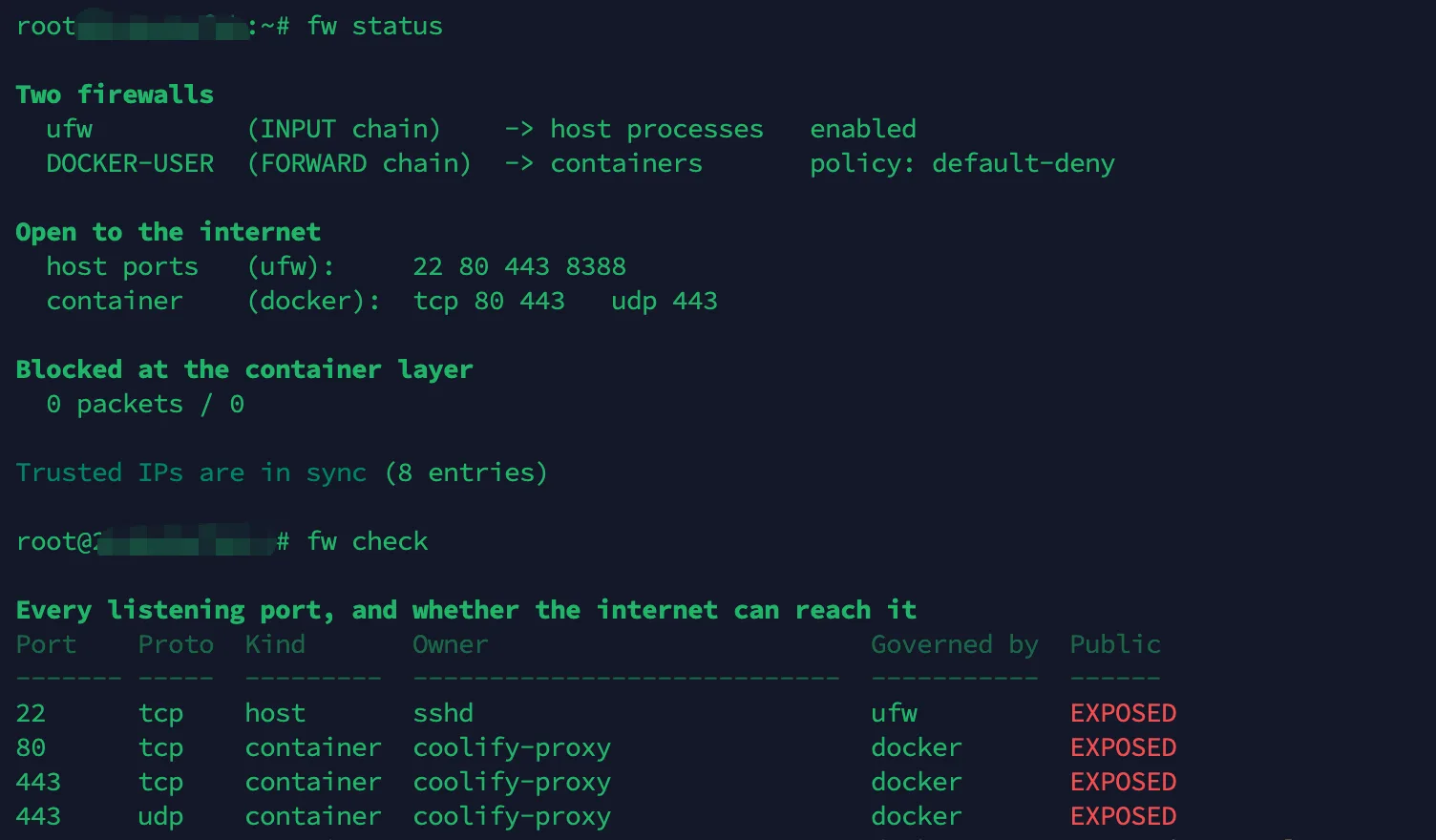
So what I ended up shipping was not a set of iptables rules. It was a CLI that removes that cognitive load entirely:
$ fw check

Port    Proto  Kind       Owner              Governed by  Public
22      tcp    host       sshd               ufw          EXPOSED
80      tcp    container  traefik            docker       EXPOSED
443     tcp    container  traefik            docker       EXPOSED
3000    tcp    container  gogs-app           docker       trusted IPs only
8000    tcp    container  coolify            docker       trusted IPs only
8388    tcp    host       shadowsocks        ufw          EXPOSED
9100    tcp    host       node_exporter      ufw          trusted IPs only
23000   tcp    container  claude-code-hub    loopback     localhost only
Host and container ports in one table, each row stating which layer governs it and whether the internet can actually reach it. Write operations figure out the layer for themselves:
fw allow <port>    open to the internet (auto-detects the layer)
fw deny  <port>    close it
fw trust <ip>      trusted IP — written to BOTH layers
fw sync            reconcile the two layers' trusted-IP lists
fw status          both layers at a glance, warns on drift
fw status actively detects drift. I deliberately added an IP to ufw only, and it called it out immediately:
198.51.100.77 ufw layer onlyBuilding that table had its own small traps: dual-stack IPv4/IPv6 binds produce two rows and have to be collapsed by (proto, port); a published range like -p 6001-6002:6001-6002 silently costs you a port if you do not expand it — and an inventory tool that under-reports is worse than no tool at all; ephemeral client-side UDP sockets will flood the table unless you filter them out.
Things I found along the way
- I was reluctant to close 6001/6002 in case websockets broke. Reading traefik’s dynamic config confirmed it was already routed via
Host(...) && PathPrefix(/app), making the directly published ports pure redundancy. Check your reverse proxy’s routes before you decide — a lot of published ports are free wins. - traefik’s 8080 dashboard port served nothing at all. It runs with
--api.insecure=false; a local curl returned 000. A published port whose backend has no listener is pure attack surface. - fail2ban banned 5 IPs within 8 seconds of being installed. In the historical logs the top attacker had already made 9,471 attempts. The good news: the successful-login records contained only my own IP and internal addresses. Nothing got in.
- One container had been showing unhealthy and I nearly wrote it off as a dead service. It was returning 200 perfectly well — the healthcheck used
localhost, which resolved to IPv6::1inside the container, while nginx only hadlisten 80on IPv4. Unhealthy does not mean down. curl it yourself before concluding anything.
Two commands to check your own machine
ufw status                      # what ufw thinks is open
iptables -t nat -L DOCKER -n    # what Docker actually opened
Every DNAT ... dpt:XXXX line in the second output is a port reachable from the internet. If it does not appear in the first output, that is your blind spot.
Part two: why I published a prompt instead of a script
All of the above is in a repository: 1oca1h0st/ufw-docker-blindspot.
There is no install.sh in it. No curl | bash. What it ships is a PROMPT.md.
That is not laziness and it is not a gimmick. It is what I concluded after actually thinking about it: this particular thing cannot be a script that works everywhere.
It cannot be a portable script
Every one of these differs between machines, and every one of them changes the code itself:
| external interface | eth0 / ens160 / enp3s0 / whatever your cloud names it |
| host firewall | ufw / firewalld / raw nftables / none |
| iptables backend | legacy vs nft — different syntax, different inspection |
| reverse proxy | traefik / nginx / caddy / Cloudflare Tunnel / none |
| which ports may close | only you know |
The last row is the one that matters. It is not a technical question — it is a question only answerable locally, and it determines what the script is supposed to do in the first place.
The conventional answers are both bad. One is a config file with twenty knobs, which hands the complexity straight back to the user — and to fill it in correctly they need to understand the problem well enough that they no longer need the tool. The other is a script that guesses, and a wrong guess takes your site offline.
And consider what would have happened if I had packaged my first version and shipped it. Go back to trap two: that version was wrong on my own machine, and only looked 89% correct because the container ports happened to all be 8080. On someone else’s machine it would be wrong in a different way — and nobody would notice, because it appears to work.
For a security tool, a silent false positive is the worst possible failure mode. It is worse than doing nothing, because it makes you believe you are safe.
Three things a script cannot do
1. Read the machine before acting. A script executes the author’s assumptions about the world, frozen at the moment they wrote it. An agent runs ss -tulnp, reads traefik’s dynamic config, greps cloudflared’s logs for originService=, and only then decides what to write. I could close 6001/6002 safely because reading the proxy config proved they were already covered by PathPrefix(/app) — no script could have made that call for me.
2. Verify itself from the outside. A script cannot prove it worked. The prompt hard-codes a two-phase verification protocol: empty the trusted-IP allowlist, confirm from off-box that every port you meant to block is genuinely unreachable, then restore the allowlist and confirm trusted access came back. Then start a throwaway container on an unused port and prove it is unreachable with zero configuration. “I made the change” and “I verified the change” are different claims — and the second is precisely what an agent can do and a script cannot.
3. Report its own failures. The last rule in the prompt is: everything you assert must be something you tested; if you did not verify it, say so. That is how trap two surfaced at all. If verification is a formality, that bug stays hidden.
What the prompt encodes is judgement, not code
This is the part I find most interesting: PROMPT.md contains almost no code. What it contains is this —
- Trust no single source; cross-check
ss,iptables -t nat -L DOCKERandufw statusagainst each other nc -zgives false positives through a proxy; use an HTTP status code or an SSH banner instead- The operator’s own egress IP may already be trusted, which will mask a failure to block
- Use
--ctorigdstport, and why: DNAT runs in PREROUTING, before FORWARD - Do not build a blocklist; build default-deny, because a blocklist cannot protect tomorrow’s containers
- Before closing a port, check whether the reverse proxy already covers it
Put any of that in a script and it becomes a comment. Comments get “cleaned up” — the next person sees --ctorigdstport, decides it is needlessly verbose, changes it to --dport, tests, watches eight ports block correctly, and commits. The bug is back.
In a prompt, that judgement is not a comment. It is the executable part.
Put differently: a script open-sources the answer from my machine. A prompt open-sources the reasoning that produced it. For this class of tool, the reasoning is the part that actually transfers.
The costs, stated plainly
If I only listed the upsides this would be marketing. There are real costs:
- Not reproducible. The same prompt produces different code on different models and different hosts. There is no version to pin.
- You cannot audit it beforehand. You can clone a script and read it before deciding to run it. A prompt’s output does not exist until you run it. For something that rewrites firewall rules, that is a real risk, not a theoretical one.
- It can be confidently wrong. An agent will make the mistakes I made, and others I did not.
- The barrier to entry is real. You need an agent with shell access, and you need to be willing to pay for it. This is not “clone it and go.”
So the repo also ships reference/: the complete, working output from one run on a real host — the rules script, the systemd unit, the full source of the CLI.
It is not meant to be installed (the interface name, trusted IPs and port policy all belong to a different machine). It is meant for comparison: so you know what “good” looks like, and have something to diff your agent’s output against.
And one line I put in the README and will repeat here: read what your agent writes before you apply it. This is a prompt, not a promise.
Where this does not apply
I do not think everything should be a prompt. For this to work, I think four conditions have to hold at once:
- Strong environmental coupling — the same logic genuinely has to look different on different machines, otherwise just ship the script
- Judgement required, not just execution — there is a “which ports can close?” question only answerable locally
- The output can be verified — objectively, from outside. This is the critical one; it is the only safeguard against an agent confabulating
- Mistakes are recoverable — DOCKER-USER is in FORWARD and cannot lock you out of SSH; the worst case is a downed site you can still log in and fix
Conversely, this is a bad fit for: libraries, protocol implementations, anything that needs identical behaviour across machines, and anything irreversible on first failure. You do not want a JSON parser that behaves differently on every host, and you do not want an agent improvising your database migrations.
There is also one question I have not resolved: scripts rot when nobody maintains them; prompts drift as models change. Which decays more gracefully, I genuinely do not know. In three years it might turn out that scripts win, or that this post has aged badly.
This is not “AI-written code”
One distinction worth drawing clearly.
There is a great deal of AI-written code on GitHub now. That is producing with AI and publishing conventionally — the artifact is still code, only the author changed. This is a different thing: the artifact is the specification, and the code is generated once per user, on their machine.
Sharing prompts is also not new — the internet is full of prompt collections. What I think is slightly different here is treating the prompt as the repository’s primary deliverable: the README shows what the finished thing looks like, how it differs from existing solutions, and which commands you get — not how to install it. Then a real reference output ships alongside it, as both a comparison target and a guarantee of honesty.
Worth noting that this space already has a mature tool, chaifeng/ufw-docker, and it is good. If you want something proven that you can install today, use it. The main differences: it is allowlist-by-default (unlisted ports stay open) where this is deny-by-default, and it covers only the container layer, leaving “which of my two firewalls governs this port?” unanswered.
Back to those three lines of output.
No error, no warning, entirely confident — and every word of it true. ufw really had opened exactly those three ports on the INPUT chain. It just never mentioned that its jurisdiction is not the same as your exposure.
Tools are the same. A script verified on my machine tells you nothing but the truth about my machine — but it does not know what your interface is called, it does not know which of your ports is load-bearing, and it will never go and check from outside before coming back to tell you it worked.
So this time I did not publish the script.
Leave a Reply